Your proof is in your inbox and production is waiting. Before you click approve, take a few extra minutes to check the details, which is far less painful than dealing with a reprint. According to InfoTrends, businesses discard about 31% of all printed materials due to errors and obsolescence. Think of your proof as your last chance to catch a mistake before it's permanently printed on hundreds of items.
KEY TAKEAWAYS:
- Verify all text character by character — company name, URL, phone number, and email.
- Use vector artwork or raster files at 300 DPI minimum to avoid blurry imprints.
- Confirm exact PMS color numbers; don't rely on how colors look on your screen.
- Make sure your artwork stays within the product's imprint area and safe zone.
- Double-check product style, color, size, and quantity against your original order.
- When stakes are high, request a pre-production sample before the full run.
- Approve only when you're confident — changes after approval are costly.
Your Step-by-Step Proof Approval Checklist
-
Text & Contact Information
Read every word carefully — don't skim. Your brain autocorrects, so typos hide easily.
- Company name, tagline, event details
- Website URL
- Phone number
- Email address
Pro tip: Read your text backwards, word by word, to catch errors your brain skips over.
-
Artwork Quality & Resolution
What looks sharp on screen can print blurry on a product.
- Use vector files (.EPS, .AI, .SVG) whenever possible — they scale without losing quality
- Raster files (.JPG, .PNG) need to be 300 DPI minimum at actual print size
- Avoid logos pulled from websites — they're typically 72 DPI, which is far too low for print
- Zoom in on the proof and check fine lines and edges; fuzzy in the proof will look worse on the product
-
Colors & Printing Method
Screens display RGB, while printing uses CMYK or Pantone (PMS). They don't match perfectly.
- Verify exact PMS color numbers on the proof — don't judge by eye
- Confirm the correct printing method (screen printing, embroidery, pad printing, digital, engraving)
- For embroidery, check thread color numbers, not just the visual
- For multi-color logos, confirm every color is listed and correct
-
Imprint Position & Safe Zone
Getting the artwork in the right place matters just as much as the artwork itself.
- Confirm the imprint location (left chest, center, full back, etc.)
- Check that art is centered — or offset exactly as intended
- Artwork must fit within the imprint area (the designated printable zone on the product)
- Keep design elements in the safe zone — at least 1/8" from any trimmed edge
- Confirm artwork was scaled proportionally — stretched logos look unprofessional
-
Product Specifications
Verify the actual product matches what you ordered.
- Correct style and model number
- Product color — confirm the exact colorway (navy, royal, and midnight are three different products)
- Size breakdown for apparel orders
- Total quantity matches your order confirmation
-
Overall Layout
Step back and look at the proof the way a recipient would.
- Does it look balanced and intentional?
- Any stray marks, artifacts, or background elements that shouldn't be there?
- If something feels off, look closer before approving
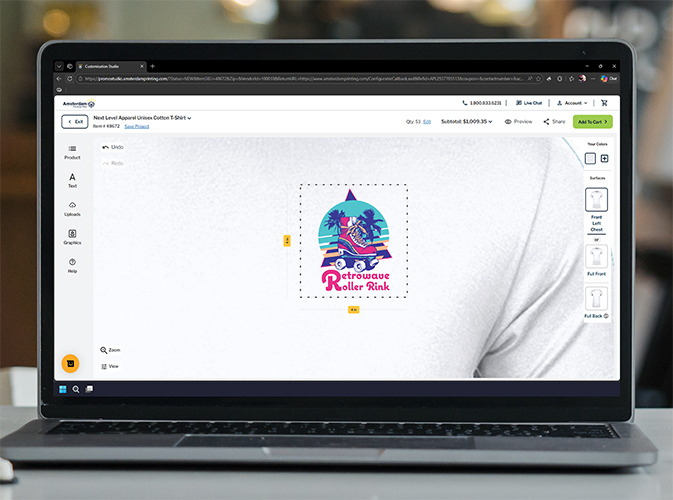
Amsterdam Printing includes a digital proof with every order so you can review and approve with confidence before anything is produced.
Key Tips to Avoid Surprises
Getting the design right is only part of the equation. Here’s what else to check:
- ✔ Watch for hidden fees. The proof stage is a good time to review your order total. Setup fees, multi-location imprints, rush production, and shipping can all add up.
- ✔ Request a pre-production sample. For large orders, premium products, or new artwork, consider ordering one imprinted sample before the full run. It's the most reliable way to confirm color, quality, and placement. Request a sample from Amsterdam Printing
- ✔ Double-check quantities. If you're just under a pricing break, ordering a few more units could save money per piece. A small buffer (5–10% extra) also helps with last-minute needs.
- ✔ Confirm your timeline. Production plus transit time must fit your in-hands date. Fragile items like glassware are also more vulnerable to shipping damage — plan accordingly.
- ✔ Know the change policy. Once you approve, production begins. Questions? Reach out before approving. See Amsterdam Printing's proof FAQ
- ✔ Review on a full-size screen. A phone screen makes it easy to miss resolution issues and text errors. Open the proof on a laptop or desktop and zoom in.
Cover these bases and you'll have nothing to worry about once you hit approve.
FAQs:
-
What if I catch an error after approving?
Contact your rep immediately. If production hasn't started, changes may still be possible — but once printing begins, a reprint is usually unavoidable.
-
My logo colors look off in the proof. Is that normal?
It can be. Screens display RGB while printing uses CMYK or PMS, which look different. Verify the Pantone or CMYK numbers on your proof against your brand standards rather than judging by screen color.
-
What's the difference between the imprint area and the safe zone?
The imprint area is the maximum space where decoration can be applied. The safe zone is the recommended buffer within that area where key elements should stay to avoid being cut off or distorted. Imprint area = the field; safe zone = where you want to play.
-
Do I need vector artwork?
Vector files (EPS, AI, SVG) are preferred because they scale without quality loss. If using a raster file (JPEG, PNG), it must be 300 DPI at the actual print size — not just on screen. Web-pulled logos at 72 DPI will almost always print poorly.
-
Is a pre-production sample always necessary?
Not for every order. It's most valuable for large quantities, premium products, or brand-new artwork. For repeat orders with proven artwork, a digital proof is typically sufficient.
Published: 6/11/26